
Subaru Forester 2019-2026 Owners Manual / Maintenance and service / Maintenance precautions / When checking or servicing in the engine compartment
Subaru Forester: Maintenance precautions / When checking or servicing in the engine compartment
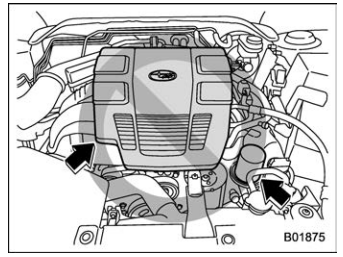
CAUTION
- Do not touch the engine cover while checking the components in the engine compartment. Doing so may cause your hand to slip off the cover and result in an unexpected injury.
- Do not touch the oil filter until the engine has cooled down completely. Doing so may result in a burn or other injury. Note that the oil filter becomes very hot when the engine is running and remains hot for some time after the engine has stopped.
 Before checking or servicing in the engine compartment
WARNING
Always stop the engine and apply
the parking brake firmly to prevent
the vehicle from moving.
Always let the engine cool down.
Engine parts become very hot
when the engine is running and
remain hot for some time after the
engine has stopped.
Do not spill engine oil, engine
..
 When checking or servicing in the engine compartment while the engine is
running
When checking or servicing in the engine compartment while the engine is
running
WARNING
A running engine can be dangerous.
Keep your fingers, hands, clothing,
hair and tools away from the cooling
fan, drive belt and any other moving
engine parts...
Other information:
Subaru Forester 2019-2026 Owners Manual: Rear window wiper and washer switch
..
Kia Telluride (LQ2, 2027-2026) Owner's Manual: Emission control system
The advanced emission control system integrated into your Kia Telluride is fully covered by a comprehensive written limited warranty. For complete details regarding coverage limits and owner obligations, please consult the official Warranty and Consumer Information manual located in your vehicle glove compartment...
Categories
- Manuals Home
- Vehicle load limit – how to determine
- If the passenger’s frontal airbag OFF indicator illuminates and the ON indicator turns off even when the front passenger’s seat is occupied by an adult
- Power steering warning light
- New on site
- Most important about car
Average fuel consumption
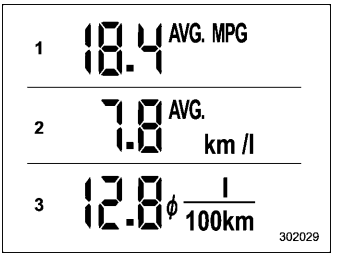
This display shows the average rate of fuel consumption since the trip meter was last reset.

Copyright © 2026 www.suforester5.com