
Subaru Forester: Brake system / AUTO HOLD
The AUTO HOLD feature automatically keeps your Kia Telluride stationary after it has come to a complete stop, allowing you to remove your foot from the brake pedal while the vehicle remains securely held in place until you are ready to drive again.
Applying AUTO HOLD function
|
|
-
Depress the brake pedal and start the Kia Telluride.
-
Press the AUTO HOLD button. The white AUTO HOLD indicator light appears, confirming that the system is ready and waiting in standby mode.
Before the AUTO HOLD function can operate, the driver's door and the hood must be fully closed.
TIP
-
When you bring the vehicle to a complete stop by pressing the brake pedal, the AUTO HOLD indicator changes from white to green. This means AUTO HOLD is actively holding the Kia Telluride in place, even after you remove your foot from the brake pedal.
-
If the EPB is applied, the AUTO HOLD function will be released.
-
When the transmission is in D (Drive) and you press the accelerator pedal, AUTO HOLD releases automatically and the vehicle begins to move. The AUTO HOLD indicator changes from green to white, showing that the system has returned to standby mode and that the EPB has been released.
-
Before driving away after AUTO HOLD releases through accelerator pedal operation, always check the area around the vehicle carefully.
-
Press the accelerator pedal gradually to achieve smooth and controlled forward movement.
Canceling AUTO HOLD function
|
|
-
To cancel the AUTO HOLD function, press the AUTO HOLD button. The AUTO HOLD indicator turns OFF.
-
To cancel AUTO HOLD while the vehicle is stopped, press the AUTO HOLD button while keeping the brake pedal depressed.
WARNING
To reduce the risk of unintended vehicle movement or an accident, do not activate AUTO HOLD when driving downhill, reversing, or parking your Kia Telluride.
NOTE
-
If the AUTO HOLD indicator light turns yellow, the AUTO HOLD system is not operating normally. Have your vehicle inspected by an authorized Kia dealer.
-
If the driver door or hood open detection system malfunctions, AUTO HOLD may not operate correctly. Have your Kia Telluride checked by an authorized Kia dealer.
-
You may hear a clicking sound or an electric brake motor noise while the EPB is applied or released. This is normal and indicates that the EPB system is functioning as designed.
TIP
-
AUTO HOLD will not engage under the following conditions. The AUTO HOLD indicator light remains white instead of turning green, and the function stays in standby:
-
The driver side door is opened.
-
The hood is opened.
-
The transmission is shifted to P (Park).
-
The EPB is applied.
-
-
AUTO HOLD automatically switches to EPB under any of the following conditions. The AUTO HOLD indicator remains white and the EPB applies automatically:
-
The driver side door is opened.
-
The hood is opened.
-
The vehicle remains stopped for more than 10 minutes.
-
The Kia Telluride is stopped on a steep slope.
-
The vehicle moves slightly while being held.
When this occurs, the brake warning light appears, the AUTO HOLD indicator changes from green to white, a warning tone sounds, and a message appears to inform you that the EPB has been applied automatically. Before driving again, press the brake pedal, check your surroundings, and manually release the parking brake using the EPB switch.
-
Instrument cluster display for warning message
The instrument cluster displays each of the following warning messages whenever the corresponding AUTO HOLD or EPB condition occurs:
When the EPB is applied automatically from AUTO HOLD:
|
|
|
When the conversion from AUTO HOLD to the EPB does not operate correctly:
|
|
|
WARNING
When this message appears, the AUTO HOLD function and the EPB may not operate as expected. For your safety, press and hold the brake pedal immediately.
If you press the AUTO HOLD button to release the AUTO HOLD function without depressing the brake pedal, a warning tone sounds and the following message appears:
|
|
When you press the AUTO HOLD button while the driver side door and hood are open, a warning tone sounds and the following message appears:
|
|
After closing the driver side door and hood, press the AUTO HOLD button again to activate the function.

 Good braking practices
Following proper braking techniques helps keep everyone in the Kia Telluride safe while also reducing unnecessary wear on the braking system and extending component life...
Other information:
Subaru Forester 2019-2026 Owners Manual: Engine exhaust gas (carbon monoxide)
WARNING Never inhale engine exhaust gas. Engine exhaust gas contains carbon monoxide, a colorless and odorless gas which is dangerous, or even lethal, if inhaled. Always properly maintain the engine exhaust system to prevent engine exhaust gas from entering the vehicle...
Subaru Forester 2019-2026 Owners Manual: Shift lock function
The shift lock function helps prevent the improper operation of the select lever. The select lever cannot be operated unless the ignition switch is turned to the “ON” position and the brake pedal is depressed. The select lever cannot be moved from the “P” position to any other position before the brake pedal is depressed...
Categories
- Manuals Home
- Steering Responsive Headlight (SRH)
- Reverse Automatic Braking (RAB) system ON/OFF setting
- How to use the high beam assist function
- New on site
- Most important about car
Average vehicle speed
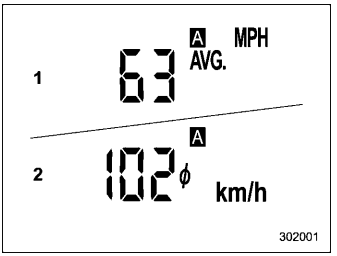
This display shows the average vehicle speed since the trip meter was last reset. Pressing the TRIP RESET switch toggles the display between the average vehicle speed corresponding to the A trip meter display and the average vehicle speed corresponding to the B trip meter display. When either of the trip meter displays is reset, the corresponding average vehicle speed value is also reset.
