
Subaru Forester: Basic screens / Favorite screen
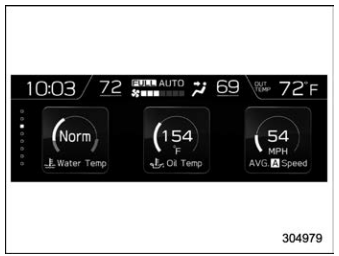
Favorite screen (display example)
This screen displays up to three optional pieces of information that can be selected from the following items.
 The engine coolant temperature is
displayed.
The engine coolant temperature is
displayed.
 The engine oil temperature is
displayed.
The engine oil temperature is
displayed.
 The average vehicle speed is
displayed.
The average vehicle speed is
displayed.
 The accelerator opening ratio is
displayed.
The accelerator opening ratio is
displayed.
 The vehicle posture is
displayed.
The vehicle posture is
displayed.
 The current rate of fuel
consumption
is displayed.
The current rate of fuel
consumption
is displayed.
 The direction of the vehicle is
displayed.*1
The direction of the vehicle is
displayed.*1
 The weather information is
displayed.*2
The weather information is
displayed.*2
 The posted speed limit of the
road
you are currently driving on is
displayed.*1
The posted speed limit of the
road
you are currently driving on is
displayed.*1
 The calendar is displayed.
 Driver Monitoring System
information
is displayed.*1
Driver Monitoring System
information
is displayed.*1
 Nothing is displayed.
*1: If equipped
*2: Models with SiriusXM Satellite Radio
NOTE
Some displayed items may not be displayed depending on the model and specifications.
The items shown in the favorite screen can be changed. For details, refer to “Favorite setting”.

 Weather information screen (if equipped)
Weather information for the destination*
Weather information for the current location
*: Only when a destination is set in the
navigation system
The weather information is displayed on
the screen...
Other information:
Subaru Forester 2019-2026 Owners Manual: Registration of the reverse tiltdown mirror angle with button “1” or “2”
CAUTION Depress the brake pedal when registering the reverse tilt-down mirror angle. Move the select lever to the “R” position, then the outside mirror angle will move to the reverse tilt-down position. Adjust the outside mirror angle. For details about the settings, refer to “Remote control mirror switch”...
Subaru Forester 2019-2026 Owners Manual: Icy road surface warning light (if equipped)
When the outside temperature is 378F (38C) or less, the icy road surface warning will illuminate to inform the driver that the road surface may be frozen. NOTE The outside temperature indicator shows the temperature in the area around the sensor...
Categories
- Manuals Home
- RAB warning light (if equipped)
- Unlock using PIN Code Access
- Instrument panel
- New on site
- Most important about car
Setting the clock manually
