
Subaru Forester 2019-2026 Owners Manual / Starting and operating / Parking your vehicle / Parking tips
Subaru Forester: Parking your vehicle / Parking tips
When parking your vehicle, always perform the following items.
- Apply the parking brake firmly.
- Put the select lever in the “P” position.
Never rely on the mechanical friction of the transmission alone to hold the vehicle.
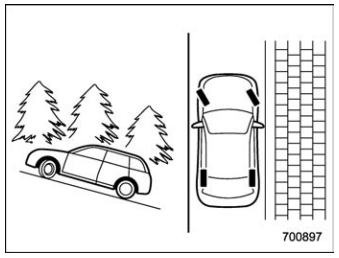
When parking on a hill, always turn the steering wheel. When the vehicle is headed up the hill, the front wheels should be turned away from the curb.
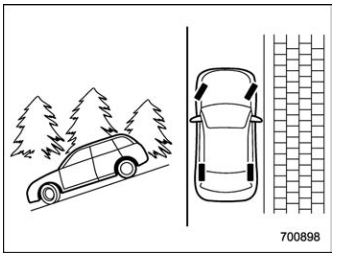
When facing downhill, the front wheels should be turned into the curb.
WARNING
- Never leave unattended children or pets in the vehicle. They could accidentally injure themselves or others through inadvertent operation of the vehicle. Also, on hot or sunny days, the temperature in a closed vehicle could quickly become high enough to cause severe or possibly fatal injuries to people.
- Do not park the vehicle over flammable materials such as dry grass, waste paper or rags, as they may burn easily if they come near hot engine or exhaust system parts.
- Be sure to stop the engine if you take a nap in the vehicle. If engine exhaust gas enters the passenger compartment, occupants in the vehicle could die from carbon monoxide (CO) contained in the exhaust gas.
CAUTION
- If your vehicle has a bumper under guard (optional), pay attention to blocks and other obstructions on the ground when parking. The underspoiler could be damaged by contact with them.
- The braking power of the parking brake may not be sufficient when stronger braking power is needed (e.g., when parking on a steep slope while towing a trailer).

 Auto Start Stop system
The Auto Start Stop system is designed to
automatically stop and restart the engine
when the vehicle is stationary for a short
period of time (while waiting for a traffic
light or in a traffic jam) after the engine has
warmed up...
Other information:
Kia Telluride (LQ2, 2027-2026) Owner's Manual: Driver Attention Warning operation
Inattentive Driving Warning function The main purpose of Driver Attention Warning is to advise the driver to take a break when the system detects signs of reduced attention during driving. Taking a break Consider taking a break The Inattentive Driving Warning light () blinks, a warning message appears on the instrument cluster, and an audible warning sounds when the system determines that the driver’s attention level is below a certain level...
Subaru Forester 2019-2026 Owners Manual: Hill descent control function
The hill descent control function will be in standby mode when the X-MODE is activated and the vehicle speed is less than approximately 12 mph (20 km/h). The function will operate when the vehicle speed is less than approximately 12 mph (20 km/h) and the accelerator ratio is less than approximately 10%...
Categories
- Manuals Home
- Steering Responsive Headlight (SRH)
- Daytime running light system
- Automatic door locking/unlocking
- New on site
- Most important about car
Driving information display
NOTE
You can set the units for both the multifunction display (black and white) and the combination meter at the same time. For details about setting the language and units, refer to “Type A combination meter” or “Menu screens”.

Copyright © 2026 www.suforester5.com