
Subaru Forester: P (Park) / R (Reverse) / N (Neutral) / D (Drive) / / R (Reverse)
This position is for backing the vehicle. To shift from the “N” to “R” position, stop the vehicle completely then move the lever to the “R” position while pressing the select lever button in.
When the ignition switch has been turned to the “ACC” position, the movement of the select lever from the “N” to “R” position is only possible by depressing the brake pedal. For details, refer to “Shift lock function”.

 N (Neutral)D (Drive)
This position is for restarting a stalled
engine. In this position, the transmission is
neutral, meaning that the wheels and
transmission are not locked...
Other information:
Kia Telluride (LQ2, 2027-2026) Owner's Manual: Wheel replacement
If you ever replace the factory metal wheels on your Kia Telluride due to damage or customization, ensure the replacement wheels precisely duplicate the original factory units in overall diameter, rim width, bolt pattern, and offset geometry. Installing wheels with incorrect physical dimensions can lead to severe mechanical and operational complications, including shortened wheel bearing and hub assembly life, degraded braking power and extended stopping distances, compromised handling precision, inadequate ground clearance, tire rubbing against body panels or suspension components, loss of tire chain clearance, inaccurate speedometer and odometer readings, misaligned headlight aiming, and altered bumper protection heights...
Subaru Forester 2019-2026 Owners Manual: Handling of radar sensors
Sensors The radar sensors, one on each side of the vehicle, are mounted inside the rear bumper. To ensure correct operation of the BSD/RCTA, observe the following precautions. Always keep the bumper surface near the radar sensors clean. Do not affix any stickers or other items on the bumper surface near the radar sensors...
Categories
- Manuals Home
- Reverse Automatic Braking (RAB) system ON/OFF setting
- How to use the high beam assist function
- Auto Start Stop warning light/Auto Start Stop OFF indicator light (yellow)
- New on site
- Most important about car
Clock/date screen
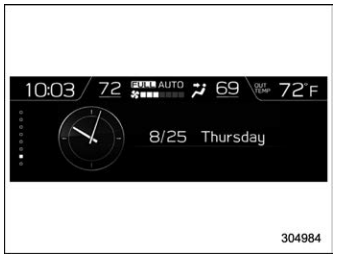
The time and date are displayed. You can adjust the time and date. For details, refer to “Clock”.

Copyright © 2026 www.suforester5.com