
Subaru Forester: Locking and unlocking by holding the access key fob / Unlocking
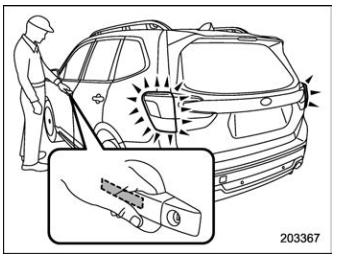
Carry the access key fob, and touch the sensor behind the door handle.
- The driver’s door handle: Either the driver’s door and fuel filler lid will unlock, or all doors and the fuel filler lid will unlock.
- The front passenger’s door handle: The fuel filler lid, rear gate and all doors will be unlocked.
Also, an electronic chirp will sound twice and the hazard warning flashers will flash twice.
Unlocking rear gate
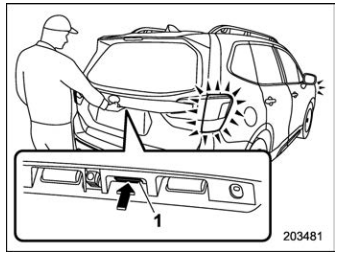
- Rear gate opener button
Carry the access key fob, and press the rear gate opener button. Either only the rear gate will unlock, or all doors and the fuel filler lid will unlock. Also, an electronic chirp will sound twice and the hazard warning flashers will flash twice.

 Door unlock selection function
When the door is unlocked using the
keyless access function, only the doors
that were set can be unlocked.
The settings can be changed with the
following methods...
Other information:
Kia Telluride (LQ2, 2027-2026) Owner's Manual: Camera cleaning system
If the rear camera lens becomes dirty, the image shown on the display may appear unclear or blurred. Use the washer system to help clean the camera and restore better rear visibility. To spray washer fluid onto the rear camera, push the wiper lever toward the instrument cluster...
Kia Telluride (LQ2, 2027-2026) Owner's Manual: AI Assistant: (if equipped)
If equipped, the AI Assistant allows you to interact with your Kia Telluride using natural voice commands. The system can help operate selected vehicle functions and respond to a variety of general questions through voice recognition, making everyday interactions more convenient while keeping your hands on the wheel whenever possible...
Categories
- Manuals Home
- Reclining the seatback (if equipped)
- How to use the high beam assist function
- Automatic door locking/unlocking
- New on site
- Most important about car
Warning screen
Example of warning
If there is a warning message or a maintenance notification, it will appear on this screen. Take the appropriate actions based on the messages indicated.

Copyright © 2026 www.suforester5.com