
Subaru Forester: Forward Collision-avoidance Assist operation / Lane-Change Side function: (if equipped)
The Lane-Change Side function of Forward Collision-Avoidance Assist is designed to help support the driver when moving toward a lane where another vehicle or motorcyclist may be approaching from the rear side. In the Kia Telluride, this function may provide assistance through the following stages:
-
Collision Warning
-
Emergency Steering
Collision Warning
|
|
-
Collision Warning
Collision Warning can alert the driver with the emergency steering warning light blinking ( ), a warning message, an audible warning, and steering wheel vibration. The warning light on the outside rearview mirror also appears when a vehicle is detected approaching from the rear in the right or left adjacent lane.
Collision Warning may activate under the following conditions:
-
Your driving speed is approximately 25-90 mph (40-145 km/h).
-
It is within a certain period after the system determines that the vehicle has departed from its lane.
-
The target enters the operating range of the Lane-Change Side function.
-
The Kia Telluride is traveling on a straight road.
Emergency Steering
|
|
|
Emergency Steering can alert the driver with the Emergency Steering warning light blinking (), a warning message, an audible warning, and steering wheel vibration.
The warning light on the outside rearview mirror appears when a vehicle is detected approaching from the rear in the right or left adjacent lane. If the system determines that a collision risk remains during the lane-change movement, Emergency Steering may activate to help avoid or reduce the chance of contact.
Emergency Steering may activate under the following conditions:
-
Your speed is approximately 25-90 mph (40-145 km/h).
-
The side vehicle or motorcycle is moving while you are driving.
-
It is within a certain period after the system determines that the vehicle has departed from its lane.
-
The target enters the operating range of the Lane-Change Side function.
-
The vehicle is traveling on a straight road.
-
Both lane markings are detected.
-
There is no detected risk of a secondary collision.
WARNING
-
The Lane-Change Side function does not operate if the vehicle in the adjacent lane is stopped.
-
These functions do not operate when a car or motorcyclist in the next lane is stationary.
-
The front-side and rear-side radar detection range is based on the width of standard roads. On narrow roads, the system may issue warnings for a vehicle or motorcyclist traveling in a neighboring lane. On wider roads, the radar may not recognize a vehicle or motorcyclist in the next lane as reliably.
-
The Lane-Change Side function deactivates in the following situations:
-
You drive more than a certain distance into the next lane.
-
You move away from the direction where the collision risk exists.
-
You turn the steering wheel rapidly.
-
You press the brake pedal.
-
Forward Collision-Avoidance Assist activates.
-
-
After the Lane-Change Side function is triggered or after completing a lane change, move the Kia Telluride toward the center of the lane. If you continue driving near the lane edge, the Lane-Change Side function may deactivate.
WARNING
If an additional accident risk is detected because of Emergency Steering, the system may provide only a Collision Warning to alert the driver to the danger.
 Lane-Change Oncoming function: (if equipped)
The Lane-Change Oncoming function of Forward Collision-Avoidance Ass..
 Evasive Steering Assist function: (if equipped)
The Evasive Steering Assist function for Forward Collision-Avoidance Assist provides Emergency Steering support when the Kia Telluride detects that steering assistance may help the driver avoid or reduce the severity of a collision...
Other information:
Kia Telluride (LQ2, 2027-2026) Owner's Manual: Seatback angle
Figure 1. 2nd row seat Figure 2. 3rd row seat To recline the seatback: Lift the seatback recliner lever for the second-row seat or pull the strap for the third-row seat...
Subaru Forester 2019-2026 Owners Manual: Moonroof switch
OPEN/CLOSE switch Open Close To open the moonroof: Press the rear side of the “OPEN/CLOSE” switch. The sunshade will also be opened together with the moonroof. The moonroof will stop at a position approximately 6 in (15 cm) away from the fully opened position...
Categories
- Manuals Home
- Reverse Automatic Braking (RAB) system ON/OFF setting
- To activate/deactivate the X-MODE
- Alarm system setting
- New on site
- Most important about car
Type B multi-function display (color LCD)
Turn the ignition switch to “ON”.
 button.
Select “Settings”.
Select “Vehicle”.
Select “Time/Date” and then select “Manual”.
button.
Select “Settings”.
Select “Vehicle”.
Select “Time/Date” and then select “Manual”.
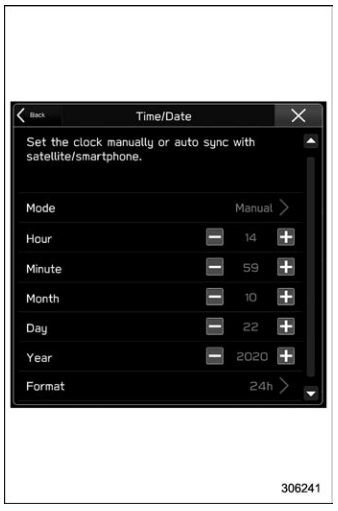
 to complete the
clock
setting.
to complete the
clock
setting.
